Read the written pattern
The written pattern spells out every row of your chart, in the order you knit them. It is written from the chart as it is now, so it changes when you correct a stitch, change a yarn or change a setting.
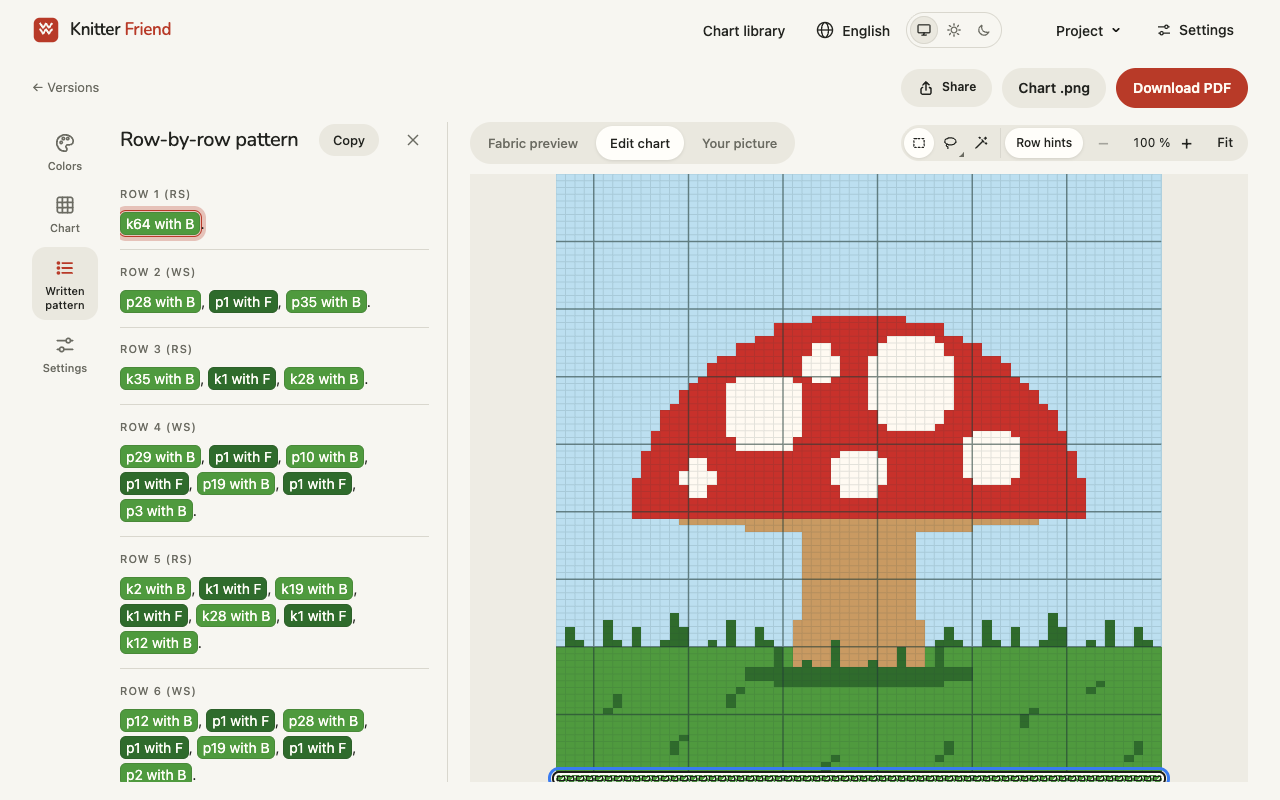
Open the pattern
Open Written pattern in the sidebar. Under Row-by-row pattern you see every row of the chart.
If the rows cannot be written yet, a message says what is missing: for example, the meaning of a symbol from your pattern’s legend, or how the chart is knitted.
How the rows are listed
Row 1 is the bottom row of the chart, the first row you knit. The rows are counted up from the First row number in Settings › Knitting, so a chart that starts later in a pattern can keep the pattern’s row numbers.
In flat knitting, each row says which side it is worked on: (RS) for the right side and (WS) for the wrong side, or the words themselves in plain words. The sides take turns, because you turn the work after each row. In the round, the rows are called rounds and have no side, because every round is worked on the right side.
Within a row, the instructions are listed in the order you work the stitches, so a right-side row and a wrong-side row read the chart in opposite directions. A row in which no square is a stitch says no stitches.
Find the stitches of an instruction
In a color chart, each instruction is shown in the color of its yarn, so you can see the color changes of a row at a glance. A repeat that works several yarns has a stripe of their colors underneath, in the order you work them.
Click an instruction to find its stitches in Edit chart: the chart scrolls to them and marks them for a moment.
Row hints on the chart
Row hints in the toolbar of Edit chart works the other way round. Point at a stitch in the chart, and a hint shows its row, its place in the row counted in working order, such as Row 3 (RS) · stitch 5 of 20, and the instruction that works it, between its neighbors. The stitches of that instruction are framed in the chart.
While Written pattern is open, the same row and instruction are marked in the list, which scrolls to them. This helps you keep your place while you knit.
Hints are not shown while you crop the picture or pick a color. Select Row hints to turn them off or on; this browser remembers your choice.
Copy the pattern
Select Copy to copy the whole pattern as text, to paste into your notes or a message. Besides every row, the text starts with a summary of the chart and of how it is knitted and written, and the keys: see the abbreviation and color keys.
For a pattern on paper, choose Download PDF: it has the chart, the keys and all the rows.
Check before you cast on
The rows say exactly what the chart shows, worked with the settings you chose. Before you start, compare the first few rows with the chart: their stitch counts, the side and the direction you work them.